New Version Available
ForceSeatPM is Changing for You
It's today! The latest update of our software - ForceSeatPM version 2.121 - is now available. This time we have prepared a very long list of new features and improvements for our users. Both racing and flight simulation enthusiasts can leverage new functionalities.
ForceSeatPM undergoes continuous development informed by customer feedback to meet demanding project requirements. The portfolio expanded to include the latest game titles including F1 22, with primary focus on developing the Tactile Audio Based Feedback system.
The update is ready to download. Let us know how it runs!
TABF Redesigned
Tactile Audio Based Feedback
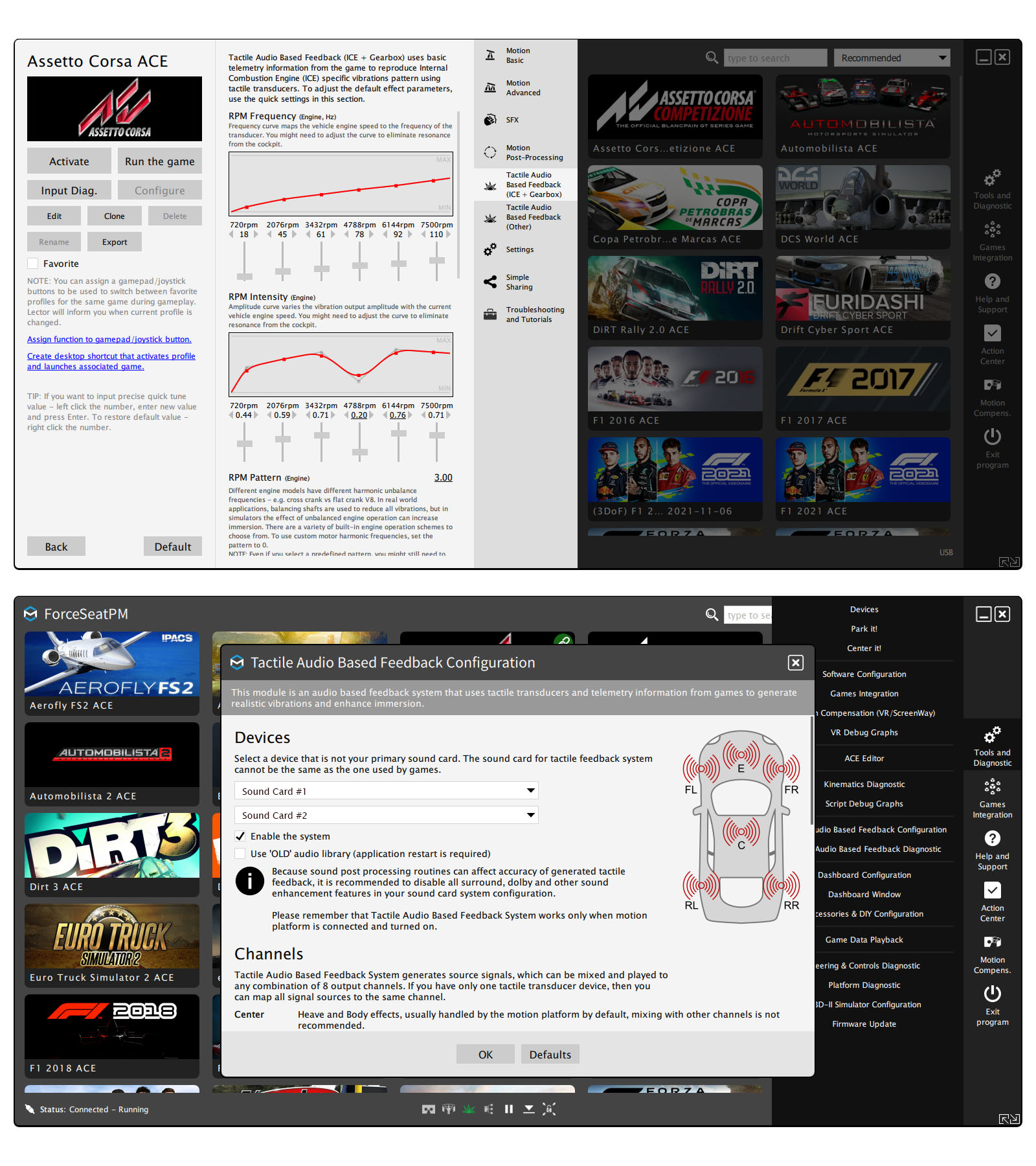
The Tactile Audio Based Feedback system has been redesigned in 2.121 and now offers new features and extended tuning capabilities.
The major innovation is the introduction of harmonic frequencies to ICE (Internal Combustion Engine) operation effects, allowing the simulation of various engine vibration patterns and different engine model imbalance. Predefined patterns exist alongside custom frequency configuration options.
The system uses an idling pattern definition with automatic interpolation at current engine RPM speed. RPM frequency curves modify the main frequency while other frequencies rescale accordingly - keeping the UI simple but the results effective. All effects received retuning with additional quick tunes for easier adjustment.
Features added in 2.121:
- Harmonic frequencies (vehicles and planes).
- RPM frequency and intensity curves (vehicles and planes).
- Suspension, wheel slip and rumble strips effects (vehicles).
- Cannon recoil effect (DCS World) with a complete reimplementation supporting harmonic frequencies and improved fire condition detection.
SFX and Tactile Audio Based Feedback system settings from old profiles might not work correctly. This does not apply to motion quick tunes - they are 100% compatible.
F1 22 - Is Now Supported
Formula One World Championship

Enter the new era of Formula 1® in EA SPORTS™ F1® 22, the official video game of the 2022 FIA Formula One World Championship™. Take your seat for a new season as redesigned cars and overhauled rules redefine race day, test your skills around the new Miami International Autodrome, and get a taste of the glitz and glamour in F1® Life.
Race the stunning, new cars of the Formula 1® 2022 season with the authentic lineup of all 20 drivers and 10 teams, and take control of your race experience with new immersive or broadcast race sequences. Create a team and take them to the front of the grid with new depth in the acclaimed My Team career mode, race head-to-head in split-screen or multiplayer, or change the pace by taking supercars from some of the sport's biggest names to the track in our all-new Pirelli Hot Laps feature.
Source: Steam
Changelog
New features and fixes
- CL01 – Gamepad/joystick buttons can be used to switch between favorite profiles for the same game.
- CL02 – Introduced a new filter that allows to display all profiles associated to the same game as currently active profile.
- CL03 – ForceSeatMI: Fixed incorrect interpretation of FSMI_TelemetryACE.extraTranslation.right/upward/forward – fields contained meters but were interpreted as millimeters.
- CL04 – VR HeadWay: Introduced custom black list that allows to block interaction with specified applications/games. The list is applied only if application/game uses Oculus, SteamVR or XTAL APIs.
- CL05 – eXpanSIM: Added detection of “eXpanSIM Playtest” edition.
- CL06 – Joystick Hotkeys: Added support for up to 64 buttons.
- CL07 – Help and Support: Added a page that displays a live USB connection tree to help evenly distribute the load on USB hubs by swapping the ports to which devices are connected.
- CL08 – VR HeadWay: Updated to work correctly with the latest Oculus Runtime version.
- CL09 – DCS World: Added support for OpenXR 3rd party mod (OpenComposite).
- CL10 – F1 2021: Added support for the changed XML configuration file format.
- CL11 – Fixed bug in work envelope calculation routine that causes available heave to be reported as 0.
- CL12 – iRacing: Fixed a bug in VR HeadWay implementation for SteamVR.
- CL13 – Introduced an option to override Windows UI scaling and scale platform manager windows independently of system scaling.
- CL14 – Introduced separated Weight Transfer Bias quick tune for Chassis Motion.
- CL15 – DCS World: Improved cannon fire effects.
- CL16 – Text input fields for tunes have been introduced to allow quickly set a specific quick tune value.
- CL17 – Tactile Audio Based Feedback has been redesigned and now introduces harmonic frequencies for ICE (Internal Combustion Engine) operation effects (KL06).
- CL18 – Tactile Audio Based Feedback: Increased tuning ability for effects like wheel slip and rumble strips (KL06).
- CL19 – SFX: Increased tuning ability for effects like wheel slip and rumble strips (KL07).
- CL20 – New firmware for NLR Motion Platform V3: Updated firmware handles new SFX vibrations system and introduces new power management routine for heavy braking cases.
- CL21 – DCS World: Harmonic frequencies were introduced for Tactile Audio Based Feedback to simulate different cannon recoils.
- CL22 – Web Interface: Updated to support new quick tunes introduced in Tactile Audio Based Feedback systems.
- CL23 – Web Interface: Optimized for smartphone screens.
- CL24 – Dirt 4/Dirt Rally 1.0: Fixed incorrect coefficients for lateral and longitudinal accelerations.
- CL25 – WRC 10: Retuned motion profile for NLR Motion Plus.
- CL26 – Network Dashboard: It uses now web interface API instead of a dedicated interface.
- CL27 – Flight Simulator 2020: Reimplemented motion profile for NLR Motion Platform V3/Traction Plus/Motion Plus.
- CL28 – NLR Motion Platform V3: Fixed a bug in motion engine causing NLR Motion Platform V3’s roll to be muted when NLR Traction Plus was present.
- CL29 – DCS World: The export script now supports different sampling rates for downstream modules. The motion export scripts expect data at 100 Hz, other export modules may expect calls at a different frequency (e.g. WWT/SimAppPro requires 33 Hz). Our export script takes this into account and calls subsequent modules at the appropriate interval.
- CL30 – Automobilista 2: Generate rumble strips effect also for B1RUMBLES and B2RUMBLES terrain types.
- CL31 – ForceSeatMI: Introduced support for Unreal Engine 5 and dropped support for versions older than 4.27. At this moment, the plugin and all examples support only UE4.27 and UE5.0.
- CL32 – ForceSeatMI: Introduced support for Unreal Engine Chaos Vehicle physics plugin.
- CL33 – ForceSeatMI: Introduced support for Unreal Engine Motion Cueing Interface by Chaos Vehicle physics plugin.
- CL34 – ForceSeatMI: Introduced support for Unreal Engine blueprint projects.
- CL35 – F1 2021/22: Introduced rumble strips effect.
- CL36 – F1 22: Added support for this game.
Known limitations
- KL01 – Aerofly FS2: After the R22 update, the accelerations data rate is 1 Hz and bank/pitch is 10 Hz. To work with such slow telemetry rates, the motion profile uses mainly roll, pitch and yaw plus interpolation when possible.
- KL02 – DCS World: Not all planes provide engine RPM for Tactile Audio Based Feedback.
- KL03 – KartKraft: Support for CKAS has to be disabled in game settings, otherwise the platform manager crashes. This is caused by a bug in the game SDK.
- KL04 – WRC 7, 8, 9, 10: Unofficial 3rd party patch is used to retrieve telemetry data. The patch might stop working if a game update is deployed making the component incompatible.
- KL05 – Flight Simulator 2020: The game runs the simulation partially even when the user is in the main menu but does not provide any flag to indicate this, causing undesired operation of the motion platform. The intelligent “main menu” detector partially suppresses this issue however the detector does not work perfectly and sometimes causes false positives when the aircraft is idling on the runway.
- KL06 – Tactile Audio Based Feedback: Profiles from 2.119 and older versions might malfunction with the updated system.
- KL07 – SFX: Profiles from 2.119 and older versions might malfunction with the updated system.
ForceSeatPM is available via our software downloads page. As always, updates are free for all Motion Systems and Qubic System platform owners.