
Made in Poland
Global Shipping

ACE Editor.

Acceleration Control Engine - the motion cueing core of ForceSeatPM, the platform manager included with every Professional Series and Qubic System platform. For advanced tuning, the ACE Editor opens the washout filters, tilt coordination, and DOF mixing that turn raw simulation telemetry into the platform movement the operator feels.

Concept

What is the ACE Editor?

ACE - Acceleration Control Engine - is a modified classical washout motion-cueing algorithm: it delivers the jolt of each change, then quietly settles the platform back to neutral. It converts vehicle or flight telemetry - acceleration, rotation, vehicle state - into the position and tilt of the platform. The cueing loop then runs at its own rate - typically 250 Hz (4 ms loop) - independent of the simulation frame rate.

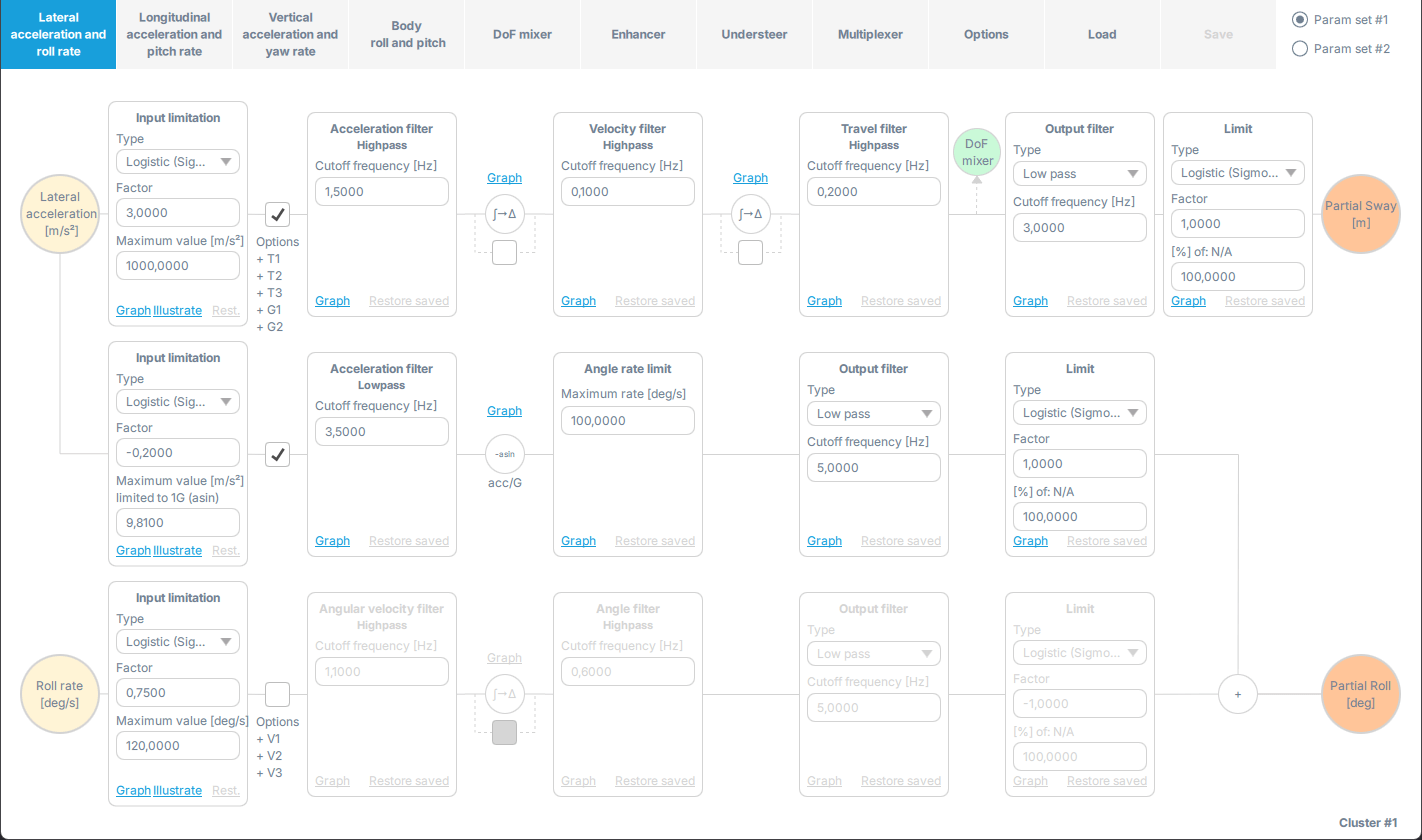
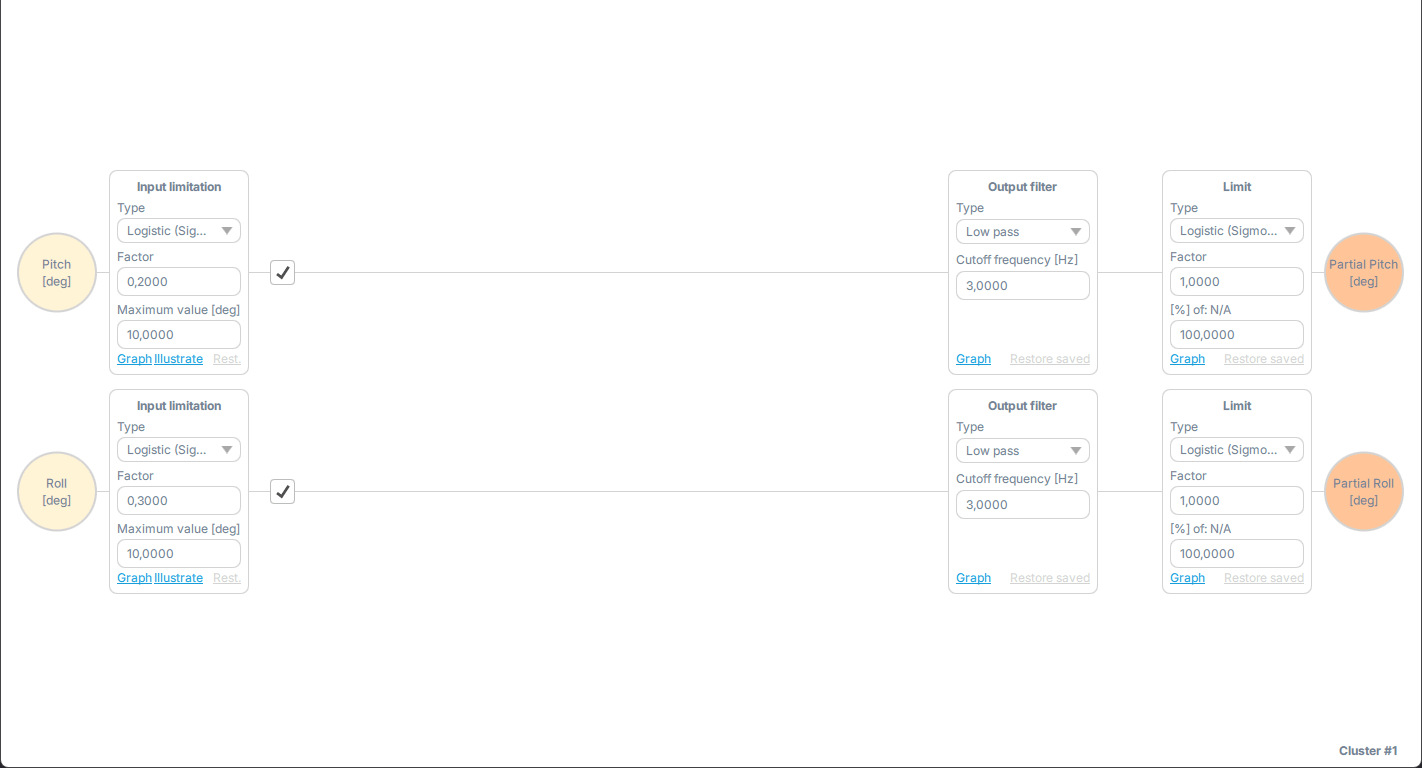
ACE Editor - the per-axis filter pipeline with its stacked signal rows and the parameter set selector
Algorithm

Classical washout, extended

High-pass filters preserve onset cues and return the platform to neutral below the perception threshold. Low-pass filters smooth the output and the tilt-coordination path. ACE adds a vertical acceleration-to-pitch transformation so flight simulations can sustain vertical-G cues during maneuvers.

Tilt coordination

Vestibular illusion as a tool

The vestibular system cannot separate inertial force from gravity. ACE uses platform rotation - inside a configurable angle-rate limit - to reproduce sustained lateral and longitudinal acceleration the platform cannot physically travel through.

Configurable

Every filter, tunable per axis

Input limiters (logistic or gain), high-pass acceleration / velocity / travel / angular filters, low-pass output smoothing, tilt-coordination smoothing, output limits, and an angle-rate cap. Adjust per axis, save, and the profile reloads instantly.

The Editor is the backend tuning interface for advanced users. It opens inside ForceSeatPM (Win+Shift+Q). It exposes every filter, limit, and mixer between the telemetry source and the actuators - the parameters most operators never need, and that integrators want full control of.

Inside the Editor

The editor, tab by tab.

Every filter, limit and mixer between the telemetry source and the actuators - click through the real interface, one tab per cueing domain.

ACE Editor
DoF mixerEnhancerUndersteerMultiplexerOptionsLoadSave
Param set #1Param set #2
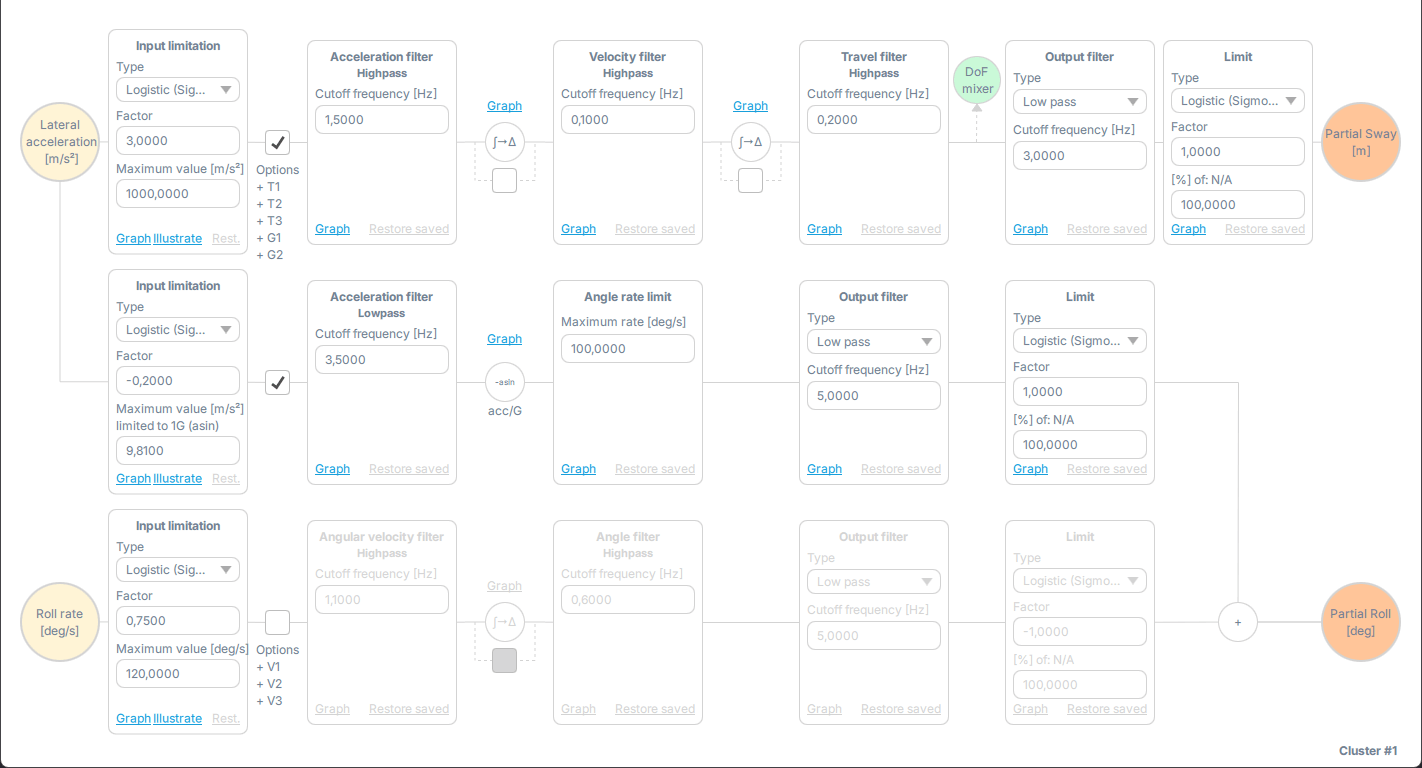
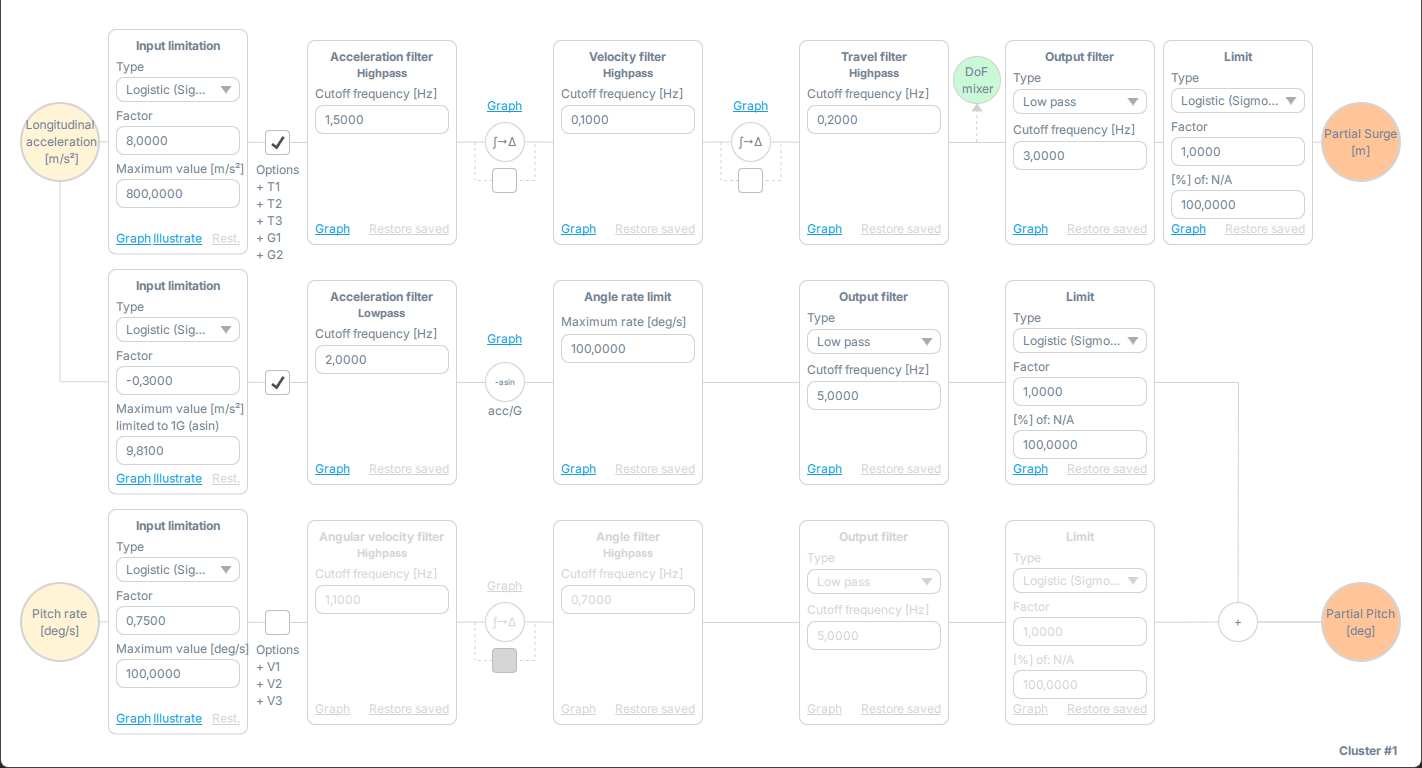
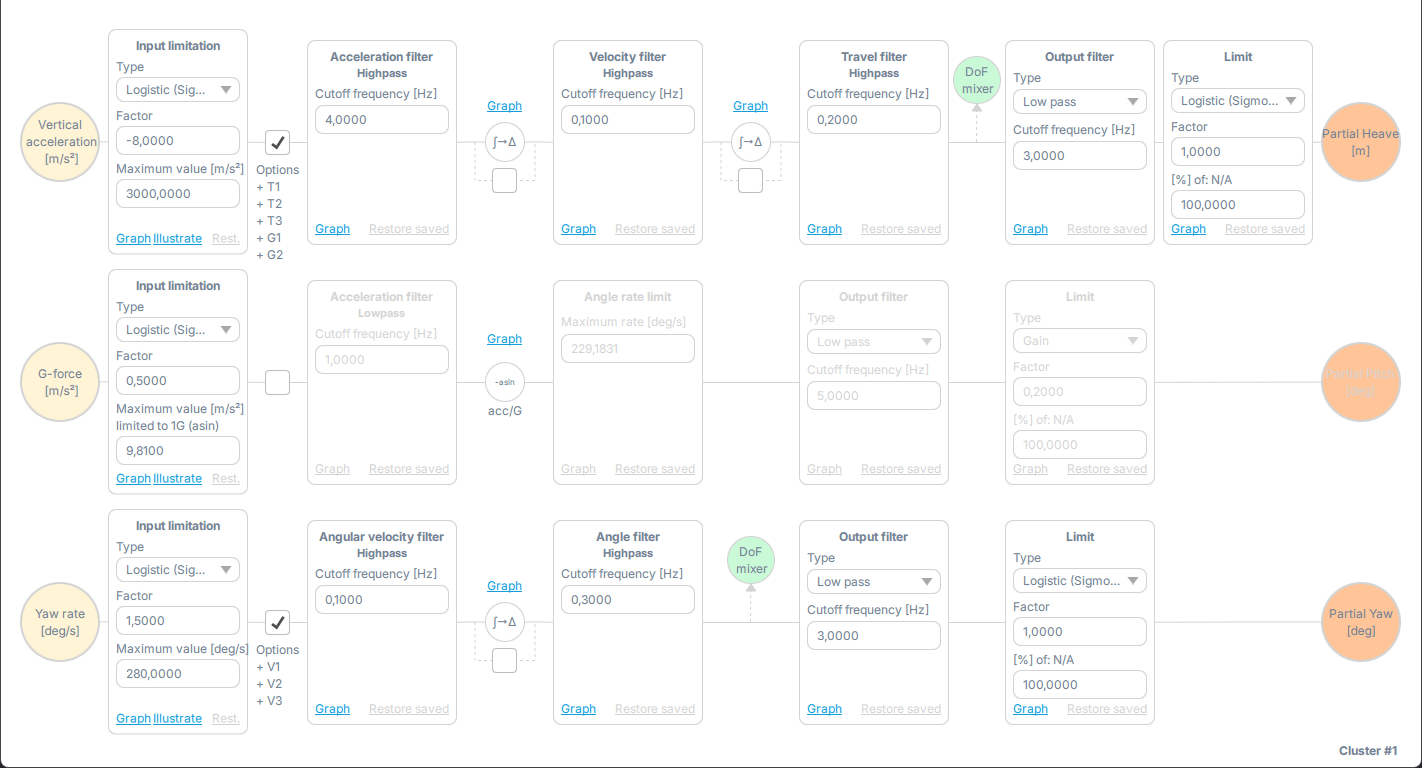
ACE Editor - Lateral acceleration and roll rate tabACE Editor - Longitudinal acceleration and pitch rate tabACE Editor - Vertical acceleration and yaw rate tabACE Editor - Body roll and pitch tab

Lateral acceleration and roll rate. Sway (side-to-side) and roll cues - cornering G, weight transfer, banked-turn loading.

Algorithm, visualized

How a raw acceleration signal becomes a finished cue.

The pipeline below shows the stages a telemetry sample passes through. The chart shows what each filter does to a single sustained step of acceleration - the part the operator feels, and the part the platform quietly walks back.

TelemetryInput limitHigh-passLow-pass + tiltOutput limitActuator
FELT ACCELERATION(specific force)TIME
Real-world signal

Sustained acceleration the body would feel - the line the platform can never fully follow.

Platform output

Sharp onset cue, then a smooth wash back toward neutral; tilt holds a residual.

Washout gap

The gap between the lines is what washout gives up - the part the platform cannot physically travel through.

Tabs, in full

Nine tabs cover every motion-cueing parameter.

Each tab handles one axis pair, or one effect that spans several axes. The defaults already deliver good motion on every supported title - the Editor exists for when an integrator wants to shape it differently.

Lateral & Roll

Sway (side-to-side) and roll cues - cornering G, weight transfer, banked-turn loading.

Longitudinal & Pitch

Surge (fore-aft) and pitch cues - braking dive, acceleration squat, climb / descent.

Vertical & Yaw

Heave (up-down) and yaw, plus a path that tilts the nose to hold sustained vertical-G cues in flight.

Body Roll & Pitch

Sustained tilt - the body angle of the vehicle itself mapped directly to a held platform angle, with no high-pass and no tilt-coordination.

DOF Mixer

Substitute missing degrees of freedom on lower-DOF rigs. Route effects from absent axes onto axes the platform actually has.

Enhancer

Road harshness and Side Slip (oversteer / grip loss) - effects layered on top of the cueing output.

Understeer

Shapes how understeer feels in the motion - from yaw rate, speed and front-wheel angle, separate from the in-game physics.

Multiplexer

Per-axis final stage - partial cueing signals meet here, and each axis gets its own gain and output limit.

Global Options

Global transforms and gravity correction - how top-frame orientation maps accelerations and angular rates - plus the #1/#2 parameter-set switch (in-air / ground vehicles vs aircraft on the ground).

Signal path

Every filter on the way to the actuator.

Telemetry enters on the left, the platform command comes out on the right - and every stage in between is tunable in the Editor.

Input limitation

Input

A logistic (S-shaped) curve or gain scaling on the raw telemetry signal.

High-pass: acceleration

Drops the steady part, keeps the sharp first hit.

High-pass: velocity

Configurable cutoff frequency sets how fast the built-up velocity fades.

High-pass: travel

Returns the platform to neutral once the cue has been delivered.

High-pass: angular velocity

Same washout (gentle drift back to center) applied to the rotation axes.

High-pass: angle

The last of the angular high-passes - returns platform rotation to neutral.

Tilt-coordination low-pass

Smooths the acceleration-to-tilt conversion - removes the seam where rotation takes over from travel.

Angle-rate limit

Caps how fast the platform tilts - kept below the speed the inner ear reliably detects (vestibular threshold).

Low-pass output

First-order smoothing, time constant τ = 1 / (2πf).

Output filters and limits

Output

Final limits - keeping motion inside the work envelope - before commands reach the actuators.

Tilt coordination

Sustaining acceleration the platform cannot physically travel through.

A 1 m platform cannot reproduce a 30-second sustained lateral G the way a real car does. ACE solves that by tilting the cockpit. The inner ear cannot tell gravity apart from inertial force - so a slow tilt, kept gentle enough to pass unnoticed, keeps feeling like sideways G.

Onset

Delivered by a short burst of platform travel - the cue the body needs in the first fraction of a second.

Sustain

Tilt takes over: the slice of gravity pressing along the side of the body becomes the cue.

Angle-rate limit

Caps how fast the platform rotates - below the vestibular threshold, the rotation is meant to pass unnoticed.

Diagnostics

See what the algorithm is doing.

Three live views verify that telemetry, the cueing math, and the work envelope all stay healthy during tuning.

Input Diagnostic

Validates telemetry reception and update rate. Surfaces missing fields (state, bodyLinearAcceleration, bodyAngularVelocity) and update intervals below the minimum sample rate (4× the highest vibration frequency - the documented minimum for faithful sine-wave reproduction).

Script Debug Graphs

Live plots of ACE algorithm output per axis - input vs. filtered vs. final command. Each line shows which filter is shaping the cue.

Platform Diagnostic

Confirms motion stays inside the work envelope. The graph turns orange the moment the algorithm asks the platform to travel further than it physically can.

Quick start

From SDK profile to live tuning.

Five steps - the loop integrators repeat for every new profile.

01

Clone an existing profile as a full copy - ACE editing requires it (a shallow copy keeps the engine linked upstream and read-only).

02

Open the ACE Editor inside ForceSeatPM - Win + Shift + Q.

03

Adjust one parameter at a time. Cueing is sensitive to interactions between filters - small changes, frequent A/B.

04

Save with Ctrl + S. The active profile reloads instantly; no platform restart, no game relaunch.

05

Watch the Input, Script Debug, and Platform diagnostics graphs while the simulation runs to verify behavior.

Before starting

Requirements & guidance

The Editor is for the cases that need something different from the supported-title defaults.

  • Bundled with ForceSeatPM - no separate install or license.

  • Runs on a built-in supported-game profile (no SDK) or on ForceSeatMI telemetry for custom software.

  • ACE cueing runs on the telemetry path - a supported-game profile or ForceSeatMI. Under ForceSeatDI direct positioning the integration team owns the cueing algorithm and the ACE washout is not in the loop.

  • Designed for advanced users; most integrators never need to open it.

  • Works on Professional Series and Qubic System platforms, plus their supporting hardware.

  • Built-in profiles can be hidden and automatic profile-switching restricted via Software Configuration.

  • Parameter sets should keep consistent polarity to avoid jumps during scenario transitions.

Describe the project being built.

Quick question or a full simulator project - the team reads everything.

What happens next?

< 1 business day

Confirmation & initial review

A dedicated account manager reads the message directly.

2-3 business days

Technical assessment

The team analyzes feasibility and prepares questions or an initial concept.

5-10 business days

Proposal delivery

Detailed technical proposal with a platform recommendation, transparent pricing, lead time, and integration timeline.

Ongoing

Team support

Ongoing support from the team behind the recommended platform - for the life of the project.