
X-Plane on Linux
Run X-Plane 11/12 on Linux with motion platform support via network telemetry.
- Ubuntu 18.04.6 LTS x64
- Ubuntu 22.04.4 LTS x64
1 Introduction
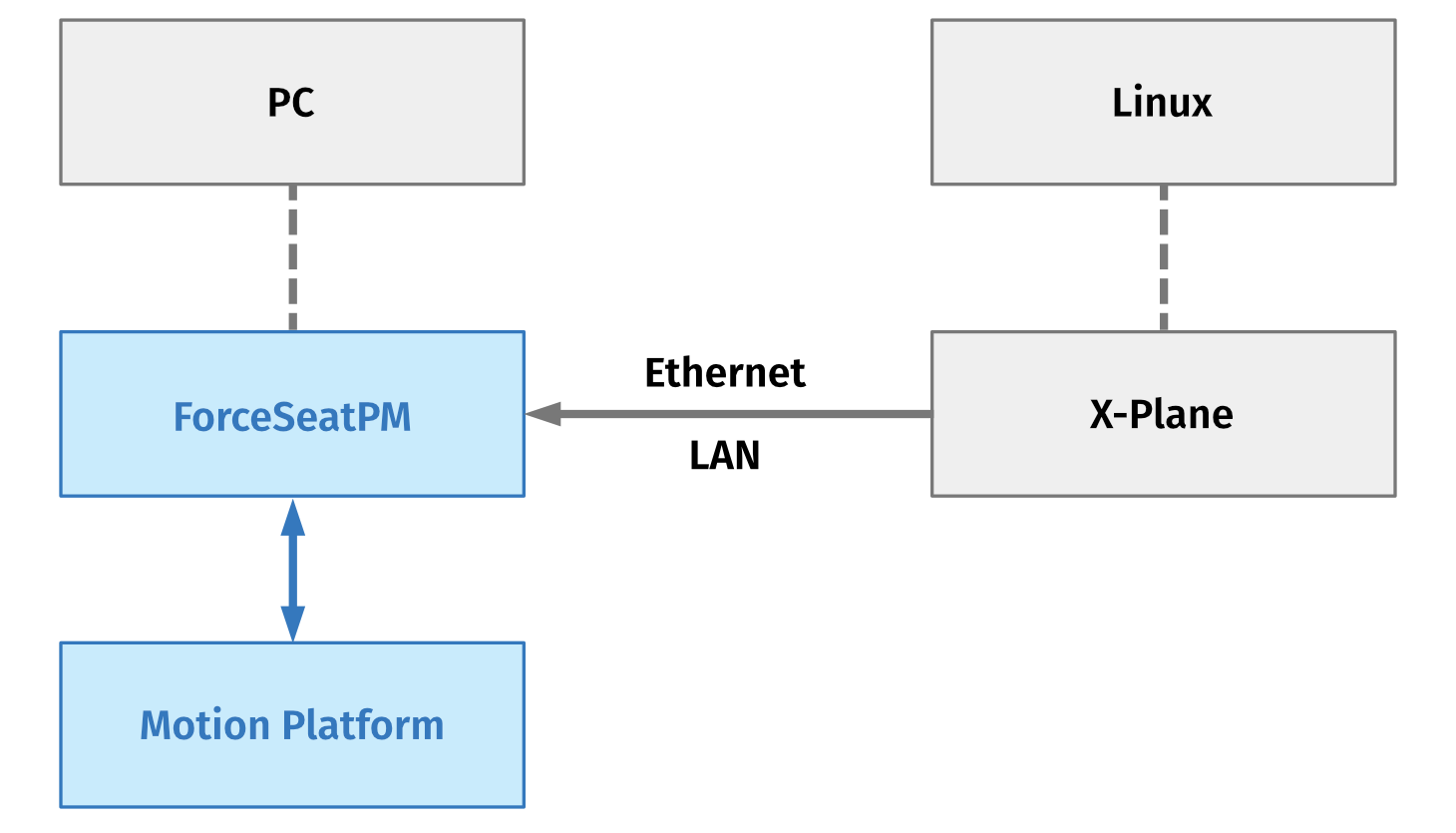
In order to run X-Plane on Linux, you need a separate Windows PC to run ForceSeatPM and control the motion platform. In that configuration, our plug-in installed in X-Plane (on Linux) sends telemetry data to Windows PC. Both Linux host and Windows PC must be connected to the same network, preferably via LAN cable. Technically, WiFi will work, but if the network latency is too high, the platform's operation may feel "disconnected" from the aircraft's behavior.
2 Configuration
1. On Linux, create following directory:
X_PLANE_INSTALLATION_DIR/Resources/plugins/MotionSystems_XPlaneConnector/64
2. Copy (and rename) following file from Windows PC:
ForceSeatPM directory\connectors\MotionSystems_XPlane12Connector64_lin.xpl
Paste it to the following destination (and rename) on Linux host:X_PLANE_INSTALLATION_DIR/Resources/plugins/MotionSystems_XPlaneConnector/64/lin.xpl
3. Create a following text file on Linux. It must contain Windows PC's IPv4 address and port, separated by colon (:):
X_PLANE_INSTALLATION_DIR/Resources/plugins/MotionSystems_XPlaneConnector/address.cfg
10.1.1.1:41234. Activate X-Plane 11 over Net (or X-Plane 12 over Net) profile in ForceSeatPM. You can find it in Professional section (not Games).
5. To use a different port, navigate to X-Plane 11 over Net (or X-Plane 12 over Net) profile in ForceSeatPM, click Configure
and enter the desired port. Do not forget to make necessary changes in address.cfg file on Linux host.
6. Start X-Plane simulation on Linux and confirm that the motion platform reacts to aircraft's movements.
3 Custom DataRefs
It is possible to use non default DataRefs for on-ground, ground-speed and engine RPM, if required.
In order to enable it: create configuration file on Linux in the following location:
X_PLANE_INSTALLATION_DIR/Resources/plugins/MotionSystems_XPlaneConnector/custom_data_refs.cfg
File content example:
OnGround=sim/aircraft/gear/acf_gear_is_skidGroundSpeed=sim/cockpit/radios/adf1_dme_speed_ktsEngineRpm0=sim/aircraft/prop/acf_des_rpm_prp[0]4 Troubleshooting
- If X-Plane does not load MotionSystems XPlaneConnector, check X-Plane
Log.txtfile for errors. It is possible that some system libraries are missing and are causing unresolved references error. - If MotionSystems XPlaneConnector is loaded, but PC does not receive data, check connector logs in:
~/MotionSystems/Log
- Make sure that your Windows Firewall does not block incoming traffic from your Linux machine.